
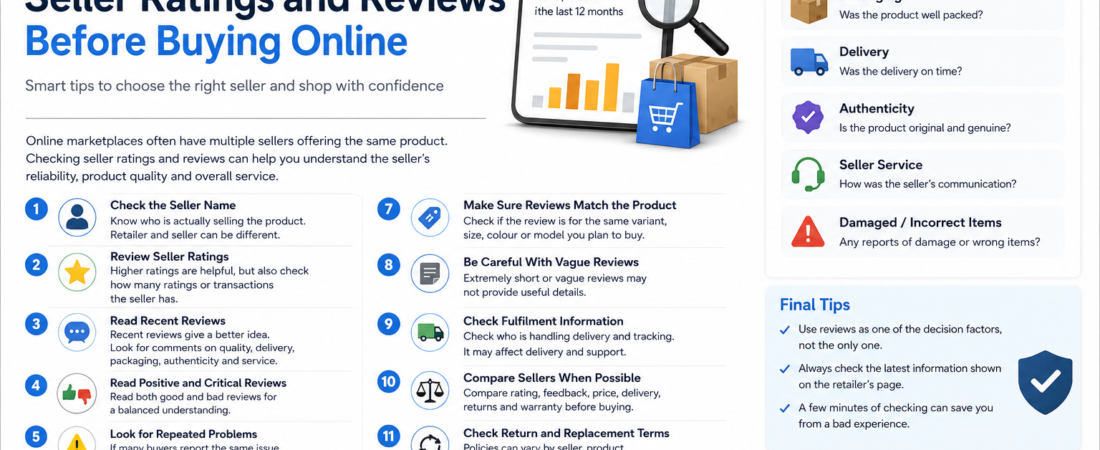
How to Check Seller Ratings and Reviews Before Buying Online
Online marketplaces often allow several sellers to offer the same or similar products. Because of this, checking the product alone may not be enough. Seller information and customer reviews can provide additional clues about the overall buying experience.
Here are some practical things to check before placing an online order.
1. Check the Seller Name
First, identify who is actually selling the product.
On a marketplace, the retailer and the seller may be different businesses. Look for the seller name shown on the product page before buying.
2. Review Seller Ratings
If the marketplace provides seller ratings, use them as one part of your decision.
A higher rating may indicate a history of satisfactory transactions, but do not rely on the percentage alone.
Also consider how many ratings or transactions the seller has received.
3. Read Recent Reviews
Recent reviews may be more useful than very old reviews because products, sellers and service quality can change over time.
Pay attention to comments about:
- Product quality
- Packaging
- Delivery
- Product authenticity
- Seller service
- Incorrect or damaged items
4. Read Positive and Critical Reviews
Do not read only five-star reviews.
Critical reviews can help you identify recurring complaints, while positive reviews can show what buyers liked about the product.
A balanced view usually provides more useful information.
5. Look for Repeated Problems
One negative review does not necessarily mean the product or seller is poor.
However, if many recent buyers mention the same issue—such as damaged packaging, incorrect sizes or missing items—it deserves more attention.
6. Check Customer Photos
Where available, customer-uploaded photos can help you compare the actual product with promotional images.
They may provide useful information about colour, size, finish, packaging or fabric.
Remember that individual photos can vary because of lighting and camera quality.
7. Make Sure Reviews Match the Product
Sometimes a listing may contain different sizes, colours or variants.
Check whether the review you are reading actually refers to the same version you plan to buy.
8. Be Careful With Extremely Positive or Vague Reviews
Very short comments such as “Excellent product” may be genuine, but they provide little useful information.
Detailed reviews describing the product, fit, quality or delivery experience are often more helpful.
9. Check Fulfilment Information
Some marketplaces show whether an order is fulfilled or shipped through their own logistics system.
This information may affect delivery, tracking and customer-service handling.
Read the current information shown on the retailer’s page rather than making assumptions.
10. Compare Sellers When Possible
If several sellers offer the same product, compare more than just price.
Consider:
- Seller rating
- Recent feedback
- Final price
- Delivery estimate
- Return conditions
- Warranty information
A slightly higher price may sometimes offer better overall value.
11. Check Return and Replacement Terms
Seller ratings are useful, but you should still review the product’s current return or replacement conditions.
Policies can vary depending on seller, product category and retailer.
12. Verify Everything Before Payment
Before completing the purchase, review:
- Seller
- Product variant
- Quantity
- Final payable amount
- Delivery information
- Return conditions
This final check can prevent many common shopping mistakes.
Final Thoughts
Seller ratings and customer reviews are useful tools, but they should not be used in isolation.
Combine seller information with product details, recent reviews, current pricing, delivery terms and return conditions. A few minutes of checking can help you make a more informed online purchase.
Explore current offers on our Amazon Deals, Flipkart Deals and Other Brand Deals pages.
Amazon Deals:https://deals.gostho.com/amazon-deals/
Flipkart Deals:https://deals.gostho.com/flipkart-deals/